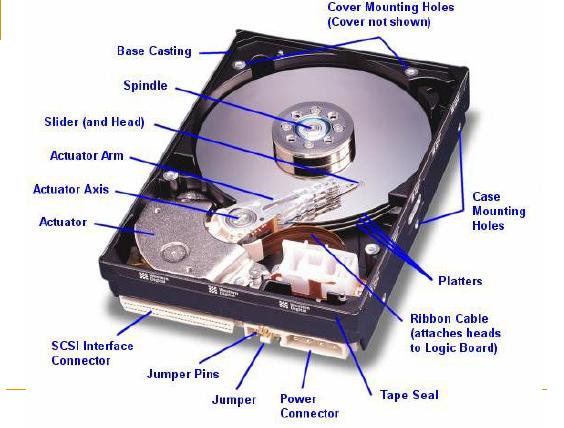
Hard disk storage media is very important on the computer. Unfortunately the limited service life. Damage to the hard drive can be caused by several things. For example:
Power supply is inadequate and damaging the hard drive controller and motor.
Fall and damage the mechanical hard drive in it or at least going bad sectors.
Too often take it without a safety brought a platter hard disk damaged due to excessive shocks.
The temperature inside a hot hard drive makes the hard drive in an unstable environment.
MTBF condition / age of the hard drive, has been reached and will be damaged.
It can still be done to fix bad sectors affected hard drive is just the condition in which the disk is still spinning, the state controller is still working hard. But the situation is still divided again, if you want to use the affected hard drive for bad sectors. Problems cause bad sectors is one of the damage that often occurs. The condition of damage by bad sectors are distinguished by the 3 state.
The condition in which the hard disk platter worn. In this condition it is not hard drive can be used. The longer the hard disk getting damaged and no longer useful for use as media storage.
Condition platter worn but not yet reached a critical state. This condition can be quite stable to drive. Possible hard drive can still be repaired because the platter is still possible dilow level.
The condition of a worn platter, either severe or mild conditions but the damage found in cluster 0 (the location where the disk partition information is stored). This condition does not allow the hard drive repaired.
Talking about the state of the hard drive to be repaired only possible improvement in the condition to 2, where the disk surface is still stable but there is minor damage in several places.
GoalAttempts to use the disk that contained bad sectors
Men-elimination location of damage to the bad sectors.
Phase 1Before performing the next stage of Phase 1 should use to ensure the condition of the damaged hard disk platters. To know this is hard to do LOW LEVEL FORMAT (LLF).LLF can be done from the BIOS or software. For the BIOS, such as generation of some old PC Pentium 486 or (586) have the option LLF. Or to use the software LLF.To get the software can be taken at Site LLF hard drive maker. Or search for a file utility such as hddutil.exe (from Maxtor - MaxLLF.exe) and wipe.exe 1.0c version 5.2.1996.
LLF is a function of the software to remove all partitions good information, data and information in the hard disk bad sectors. This software is also useful to correct errors in the FAT 32 partition from Windows Fdisk.
After running the LLF program, then the hard drive clean will really like the first time.
Warning: Use of LLF software will erase all data in the hard disk
Stage 2The next process is to try and error method. Stages for this session are:
a. Create hard disk partitions: With FDISK program with 1 partition only, either primary or extended partitions. For the primaries can be done with a single hard drive, but if want the hard drive as extended, required a hard drive as the boot process and already have a primary partition (the partition to boot).
b. Format the hard disk: With the FORMAT C: / C. Addition of the command / C to run the option checks if there is bad sectors. During the formatting process check on the percentage of how much damage the hard disk. This is shown in the picture below.
When the program displays FORMAT Trying to recover allocation unit xxxxxx, meaning that the program was checking the condition in which the disk is going bad sectors. The assumption in the test below is with Seagate 1.2 GB hard drive with 2 small locations and estimate the damage percentage figures shown by the program FORMAT:
Display Conditions on the percentage of program formats that can be usedBoth the 0-20% 20%Bad sectors 21% DisposedBoth the 22-89% 67%Bad sectors 91% DisposedBoth the 91-100% 9%c. Create a partition again: With FDISK, remove all partitions in the hard disk before, and make appropriate re-partition record damage. The assumption in the figure below is a partitioning with Primary and Extended partitions. In the Primary partition is invisible and only shown to the extended partition. Distribution in the picture below is on drive D and F (22MB and 12 MB) discarded because there are bad sectors.While the E and G (758MB and 81MB) is a drive that is still in good condition and can be used.
If you are stubborn enough to fix your bad sectors, can also be done with the try-error by repeating the search for the location of bad sectors on the disk is smaller stages, such as making a lot of partitions to minimize the possibility of wasted space on the partition that will be discarded. The more determined to seek damages in a place where there are bad sectors, the better, only this way will require a longer time, although the results are quite satisfactory to minimize hard drive location where the damage occurred.
d. To confirm what already is bad sectors on hard disk to be disposed partitions, format the entire drive letter with the command FORMAT / C. If indeed there are bad sectors on the partition is removed (assuming the test is bad sectors on the drive letter D and F), then the partition can be immediately discarded. But if something goes wrong, such damage is not bad sectors in the partition to be removed but there is on a partition that will be used, you must repeat the process from the beginning by removing the partition where there are errors in the dividing partition affected by bad sectors. Things to remember: Making partition done from beginning to end, such as C, D, E and the next. To remove the partition using the opposite way, from Z to C.Error in removing and making wild random partitions will disrupt the system hard drive partitions.
e. The next process is to remove the partitions that are not used anymore. After examination by the FORMAT program, then the next process is to remove the partition that contains bad sectors. In the picture below is: Stage throw 2 partitions with FDISK to drive letter D and E. For E and G is a partition drive letter that will be used.
F. At the end of the stage you can check hard disk partition with option 4 (Display partitisi) on FDISK program, an example in the picture below are the remaining 3 drives: C as the primary partition (not visible), 2 extended partitions are partitions that contain good and bad sectors has been deleted.
G. End process. You have a hard drive with a condition that has been repaired because of bad sectors. Letter on C drive is shared as a Primary partition and used as a boot, D (758MB) and E (81MB) is a partition into 2 and 3 on the extended partition.
If you are not satisfied with the results looking for bad sectors, then you can repeat the above prosesur. To perform these tips you should already know the procedure in making the partitions with FDISK.
That it should be noted in this tip is, be careful in the use of LLF program. We recommend using a single drive to use this program. Mistakes do LOW LEVEL FORMAT on the hard drive is very fatal and can not be dikembalikin like its original state.
For the affected hard drive should use the hard drive BAD SECTOR whose condition has not been too severe or there are bad sectors in some places and not sporadic spread. Damage in many places (sporadic bad sectors) on the hard drive will make it difficult finding a place where there are bad sectors.
Power supply is inadequate and damaging the hard drive controller and motor.
Fall and damage the mechanical hard drive in it or at least going bad sectors.
Too often take it without a safety brought a platter hard disk damaged due to excessive shocks.
The temperature inside a hot hard drive makes the hard drive in an unstable environment.
MTBF condition / age of the hard drive, has been reached and will be damaged.
It can still be done to fix bad sectors affected hard drive is just the condition in which the disk is still spinning, the state controller is still working hard. But the situation is still divided again, if you want to use the affected hard drive for bad sectors. Problems cause bad sectors is one of the damage that often occurs. The condition of damage by bad sectors are distinguished by the 3 state.
The condition in which the hard disk platter worn. In this condition it is not hard drive can be used. The longer the hard disk getting damaged and no longer useful for use as media storage.
Condition platter worn but not yet reached a critical state. This condition can be quite stable to drive. Possible hard drive can still be repaired because the platter is still possible dilow level.
The condition of a worn platter, either severe or mild conditions but the damage found in cluster 0 (the location where the disk partition information is stored). This condition does not allow the hard drive repaired.
Talking about the state of the hard drive to be repaired only possible improvement in the condition to 2, where the disk surface is still stable but there is minor damage in several places.
GoalAttempts to use the disk that contained bad sectors
Men-elimination location of damage to the bad sectors.
Phase 1Before performing the next stage of Phase 1 should use to ensure the condition of the damaged hard disk platters. To know this is hard to do LOW LEVEL FORMAT (LLF).LLF can be done from the BIOS or software. For the BIOS, such as generation of some old PC Pentium 486 or (586) have the option LLF. Or to use the software LLF.To get the software can be taken at Site LLF hard drive maker. Or search for a file utility such as hddutil.exe (from Maxtor - MaxLLF.exe) and wipe.exe 1.0c version 5.2.1996.
LLF is a function of the software to remove all partitions good information, data and information in the hard disk bad sectors. This software is also useful to correct errors in the FAT 32 partition from Windows Fdisk.
After running the LLF program, then the hard drive clean will really like the first time.
Warning: Use of LLF software will erase all data in the hard disk
Stage 2The next process is to try and error method. Stages for this session are:
a. Create hard disk partitions: With FDISK program with 1 partition only, either primary or extended partitions. For the primaries can be done with a single hard drive, but if want the hard drive as extended, required a hard drive as the boot process and already have a primary partition (the partition to boot).
b. Format the hard disk: With the FORMAT C: / C. Addition of the command / C to run the option checks if there is bad sectors. During the formatting process check on the percentage of how much damage the hard disk. This is shown in the picture below.
When the program displays FORMAT Trying to recover allocation unit xxxxxx, meaning that the program was checking the condition in which the disk is going bad sectors. The assumption in the test below is with Seagate 1.2 GB hard drive with 2 small locations and estimate the damage percentage figures shown by the program FORMAT:
Display Conditions on the percentage of program formats that can be usedBoth the 0-20% 20%Bad sectors 21% DisposedBoth the 22-89% 67%Bad sectors 91% DisposedBoth the 91-100% 9%c. Create a partition again: With FDISK, remove all partitions in the hard disk before, and make appropriate re-partition record damage. The assumption in the figure below is a partitioning with Primary and Extended partitions. In the Primary partition is invisible and only shown to the extended partition. Distribution in the picture below is on drive D and F (22MB and 12 MB) discarded because there are bad sectors.While the E and G (758MB and 81MB) is a drive that is still in good condition and can be used.
If you are stubborn enough to fix your bad sectors, can also be done with the try-error by repeating the search for the location of bad sectors on the disk is smaller stages, such as making a lot of partitions to minimize the possibility of wasted space on the partition that will be discarded. The more determined to seek damages in a place where there are bad sectors, the better, only this way will require a longer time, although the results are quite satisfactory to minimize hard drive location where the damage occurred.
d. To confirm what already is bad sectors on hard disk to be disposed partitions, format the entire drive letter with the command FORMAT / C. If indeed there are bad sectors on the partition is removed (assuming the test is bad sectors on the drive letter D and F), then the partition can be immediately discarded. But if something goes wrong, such damage is not bad sectors in the partition to be removed but there is on a partition that will be used, you must repeat the process from the beginning by removing the partition where there are errors in the dividing partition affected by bad sectors. Things to remember: Making partition done from beginning to end, such as C, D, E and the next. To remove the partition using the opposite way, from Z to C.Error in removing and making wild random partitions will disrupt the system hard drive partitions.
e. The next process is to remove the partitions that are not used anymore. After examination by the FORMAT program, then the next process is to remove the partition that contains bad sectors. In the picture below is: Stage throw 2 partitions with FDISK to drive letter D and E. For E and G is a partition drive letter that will be used.
F. At the end of the stage you can check hard disk partition with option 4 (Display partitisi) on FDISK program, an example in the picture below are the remaining 3 drives: C as the primary partition (not visible), 2 extended partitions are partitions that contain good and bad sectors has been deleted.
G. End process. You have a hard drive with a condition that has been repaired because of bad sectors. Letter on C drive is shared as a Primary partition and used as a boot, D (758MB) and E (81MB) is a partition into 2 and 3 on the extended partition.
If you are not satisfied with the results looking for bad sectors, then you can repeat the above prosesur. To perform these tips you should already know the procedure in making the partitions with FDISK.
That it should be noted in this tip is, be careful in the use of LLF program. We recommend using a single drive to use this program. Mistakes do LOW LEVEL FORMAT on the hard drive is very fatal and can not be dikembalikin like its original state.
For the affected hard drive should use the hard drive BAD SECTOR whose condition has not been too severe or there are bad sectors in some places and not sporadic spread. Damage in many places (sporadic bad sectors) on the hard drive will make it difficult finding a place where there are bad sectors.

Tidak ada komentar:
Posting Komentar